The creation of the ISO image will erase all existing information from the USB drive.
1. Download **[Rufus](https://rufus.ie/)** software and open the downloaded file. 2. Choose the designated USB flash drive in the **Device**: [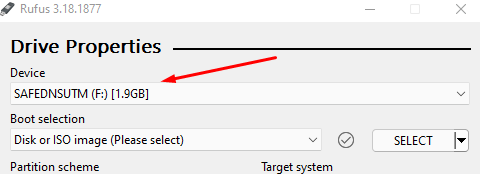](https://docs.safedns.com/uploads/images/gallery/2022-08/FEIEeAEQkjT7qRyA-1-creating-a-usb-flash-startup-disk.png) 3. Select **Disk or ISO image** in Boot Selection. 4. Click on **Select** and open the downloaded SafeUTM image. 5. All other settings remain default. 6. Click on **Start**. 7. In the drop-down menu, select **Write in DD image mode**. 8. A dialog window will pop up for you to confirm the USB flash drive write. Further, follow the instructions of the installation wizard. SafeUTM installation steps are described in the [**Installation Process**](https://docs.safedns.com/books/3-installation/page/installation-process) article. --- #### **Linux** In order to create a USB flash startup disk in Linux, all you need is to copy blocks of SafeUTM ISO image to your device. Below two ways to do it are described: ##### **Using the command `gnome-disks` [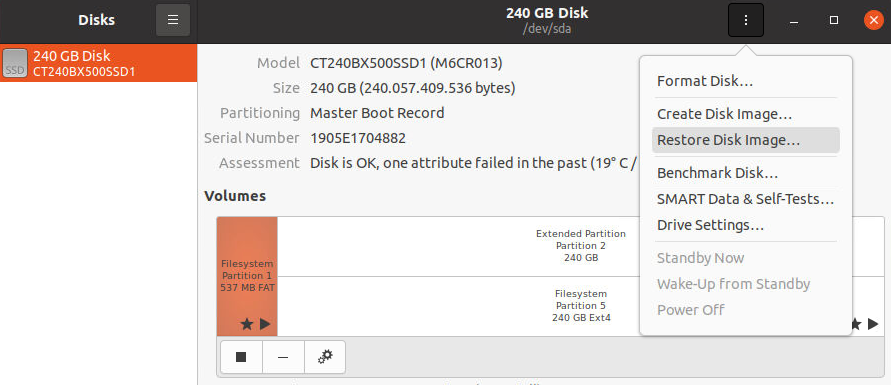](https://docs.safedns.com/uploads/images/gallery/2022-08/Jny4IFvarjsSgGOR-2-creating-a-usb-flash-startup-disk.png)** ##### **Manually** 1\. Check image integrity: ``` $ md5sum /home/safedns/SafeUTM.iso 8c872cb6b720f6fd6683107681645156 /home/safedns/SafeUTM.iso ``` The size must be the same as in the account the image was downloaded from. If the number is different, the file is corrupted and needs to be downloaded again. 2\. Find the USB flash disk in the system: ``` $ lsblk --nodeps -o name,size,fstype,tran,model,mountpoint /dev/sd* NAME SIZE FSTYPE TRAN MODEL MOUNTPOINT sdx 7,5G usb USB_DISK_3.0 sdx1 7,5G vfat /run/media/safedns/D661-82E2 ``` We can see there is `/dev/sdx` USB flash disk, as well as the file system mounted on it. 3\. Unmount the file system: ``` sudo umount /run/media/safedns/D661-82E2 ``` 4\. Write the image to the disk: ``` $ sudo dd if=/home/safedns/SafeUTM.iso of=/dev/sdx bs=1M oflag=direct status=progress ``` 5\. Prepare the disk to be ejected: ``` $ sudo eject /dev/sdx ```