For these scripts to work, it is necessary to set up all domain and browser security policies described in [**User Authorization**](https://docs.safedns.com/books/42-setup-users/page/active-directory-user-authorization).
--- #### User Authorization You need to add the script to scenarios executed at the system [**log on**](https://docs.microsoft.com/en-us/previous-versions/windows/it-pro/windows-server-2008-R2-and-2008/cc770908(v=ws.11)). **UTMLogon\_script.vbs** ```VBScript Dim IE Set IE = CreateObject("InternetExplorer.Application") IE.Visible = True IE.Fullscreen = False IE.Toolbar = False IE.StatusBar = False Wscript.Sleep(3000) IE.Navigate2("http://google.com") Wscript.Sleep(20000) IE.Quit ``` --- #### User De-Authorization It is convenient to use this script when one computer is used by different users to go to internet resources. This script can be downloaded from the web interface by clicking **Download deauthorization script**. To do this, in the section **Users -> Authorization**, check the box **Web authentication**: [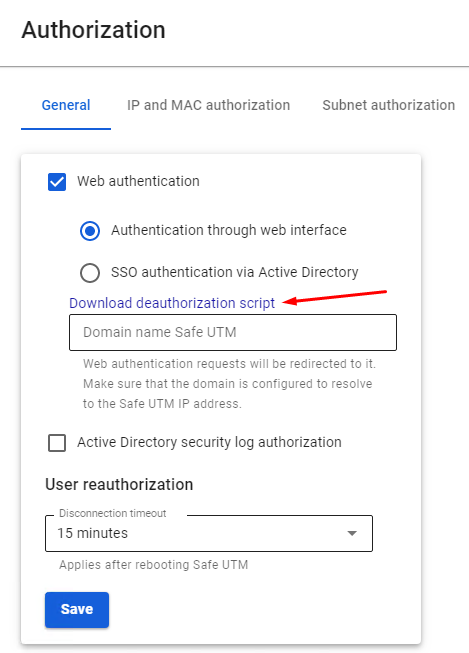](https://docs.safedns.com/uploads/images/gallery/2022-08/cp87ddx6RV0s4G5b-1-automatic-authorization-and-de-authorization-scripts.png) For user de-authorization to work, it is necessary to install the server certificate as a trusted root certification center on users’ computers. You can do this locally or through domain group policies, as described in the [**instructions**](https://docs.safedns.com/link/67#bkmrk-adding-certificate-v). You also need to disable the warning about certificate address mismatch in Internet Explorer properties: [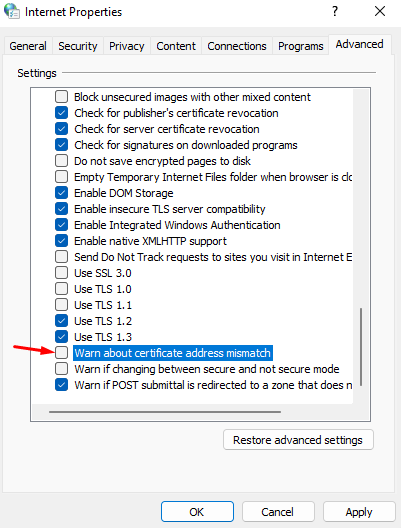](https://docs.safedns.com/uploads/images/gallery/2022-08/09gC6brhKGsjSXvY-2-automatic-authorization-and-de-authorization-scripts.png) This parameter can also be set up in GPO by changing the registry parameter: HKEY\_CURRENT\_USER\\Software\\Microsoft\\Windows\\CurrentVersion\\Internet Settings parameter `WarnonBadCertRecving = 0` Next, you need to add the script executed when the user [**logs out**](https://docs.microsoft.com/en-us/previous-versions/windows/it-pro/windows-server-2008-R2-and-2008/cc753583(v=ws.11)) of the system: **UTMLogout\_script.ps1** ```Powershell add-type @" using System.Net; using System.Security.Cryptography.X509Certificates; public class TrustAllCertsPolicy : ICertificatePolicy { public bool CheckValidationResult( ServicePoint srvPoint, X509Certificate certificate, WebRequest request, int certificateProblem) { return true; } } "@ [System.Net.ServicePointManager]::CertificatePolicy = New-Object TrustAllCertsPolicy [Net.ServicePointManager]::SecurityProtocol = "tls12, tls11, tls" Invoke-RestMethod -Uri "https://