# Instructions for running PowerShell scripts
Use ready-made scripts downloaded from your server to create a VPN connection in Windows versions 8.1 and 10.
---
If you are using Windows 7, you must create the connection manually (see [**Manually create user-side VPN connections**](https://docs.safedns.com/books/6-instructions-and-troubleshooting/page/creating-a-vpn-connection-in-windows-7)).
---
#### Which VPN protocol should I choose?
With several options for possible VPN connections, choose protocols according to the following criteria:
1. **IKEv2/IPsec** is the best protocol in terms of performance and connection reliability.
2. **SSTP** is a protocol based on TCP and SSL. Choose it if the IKEv2 connection does not go through your provider.
3. **L2TP/IPsec** is reliable in terms of encryption, but not the most optimal in terms of speed and performance.
---
#### How do I run a PowerShell script?
1\. Download the script:
**From SafeUTM:**
- By navigating to the section **Users -> VPN connections**
- Set the flag for the required connection protocol, if required, fill in the fields and click **Save**
- Click on the link ****PowerShell - script to configure connections****[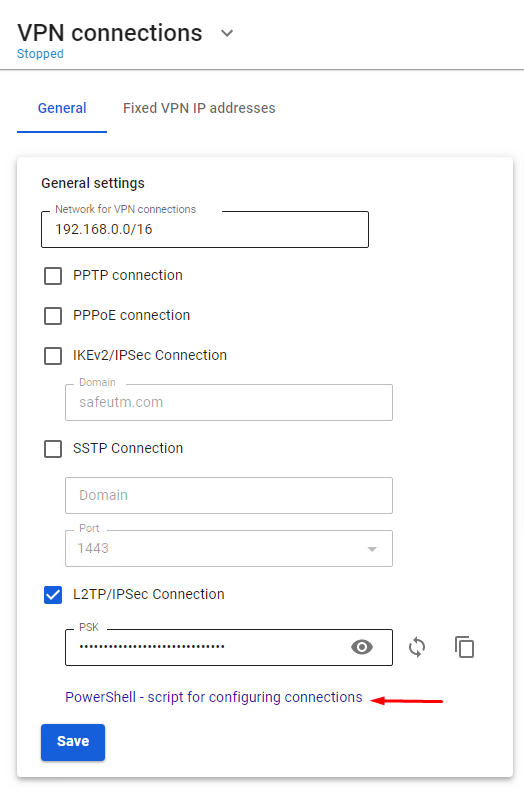](https://docs.safedns.com/uploads/images/gallery/2022-08/qfmLoiRQEcP69ATT-1-instructions-for-running-powershell-scripts.png)
- Transfer the downloaded file to the device where you want to create a VPN connection.
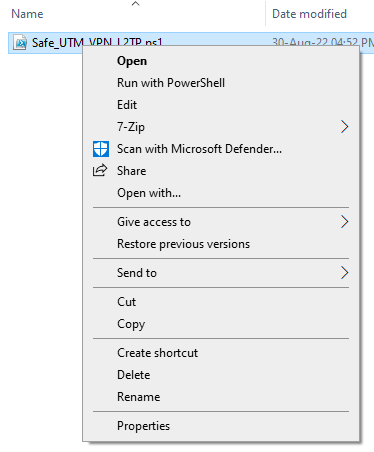
2\. Right-click on the downloaded file and select **Properties** from the context menu.
[](https://docs.safedns.com/uploads/images/gallery/2022-08/xAXZg1MYLVsLVTY3-2-instructions-for-running-powershell-scripts.png)
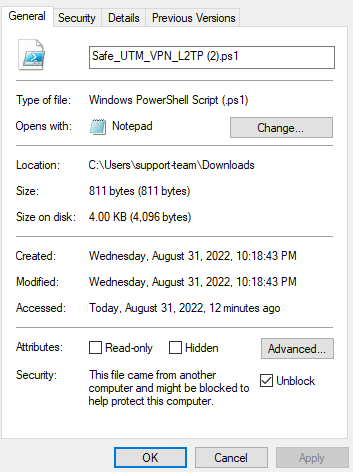
3\. Check the box **Unlock** in the lower right corner of file properties (by default, the OS blocks the execution of files downloaded from the Internet)
[](https://docs.safedns.com/uploads/images/gallery/2022-08/KSQl8KupCppF7VX7-3-instructions-for-running-powershell-scripts.png)
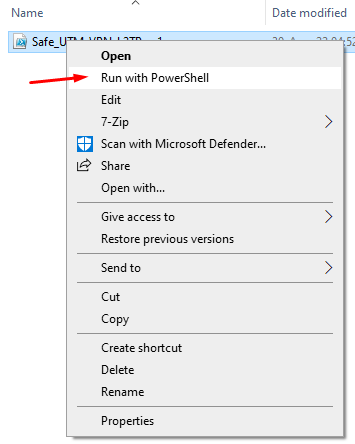
4\. Right-click on the file again and select **Run in PowerShell** in the context menu.
[](https://docs.safedns.com/uploads/images/gallery/2022-08/4HkybbL3wfpmXMbK-4-instructions-for-running-powershell-scripts.png)
If the error "Script execution is disabled on this system" appears, you need to enable script execution by running the command in PowerShell (call it up from the Start menu): `Set-ExecutionPolicy Unrestricted`
5\. Answer **Yes** to the question about making changes to your computer.
6\. The connection is created. Click **Connect** in the list of your networks.
---
#### What should I do if I can't run the script?
You may not have enough rights to run scripts or PowerShell is not installed on the system.
Use the instructions for creating a connection in [**Windows 10**](https://docs.safedns.com/books/6-instructions-and-troubleshooting/page/creating-a-vpn-connection-in-windows-10) and [**Windows 7**](https://docs.safedns.com/books/6-instructions-and-troubleshooting/page/creating-a-vpn-connection-in-windows-7).