If possible, do not use this type of connection. This connection method can be unstable, has huge redundancy, has low performance, and does not support the strongest encryption. IPsec-IKEv2 is recommended instead. All modern operating systems support IKEv2, or there are applications for them.
--- #### Configuring SafeUTM Global Settings 1\. Go to **Users -> VPN connections.** 2\. Check the box **L2TP/IPsec Connection.** 3\. Enter the secret phrase (PSK key). 4\. Click on **Save**. [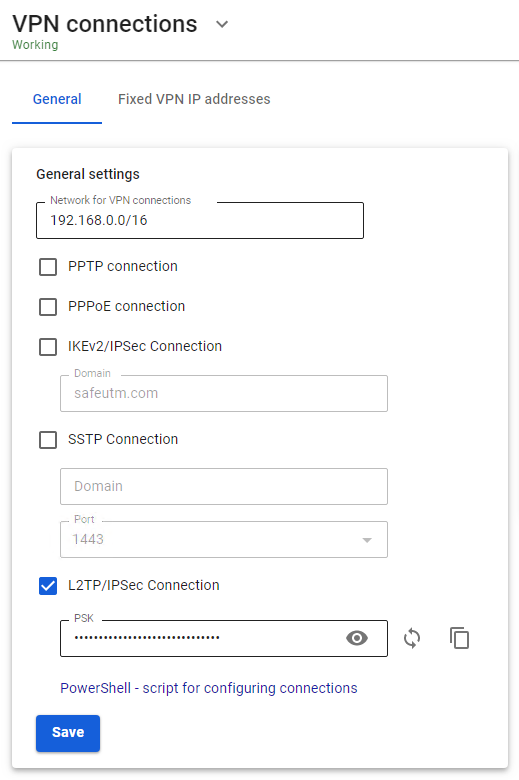](https://docs.safedns.com/uploads/images/gallery/2022-08/0zN8AYv3Pw5d3rl0-1-l2tp-ipsec.png) --- #### Configuring Users in SafeUTM Allow the user to connect via VPN from the Internet by checking in the user settings (**Users -> User & Group -> General tab**) in the box **Allow remote access via VPN**.L2TP IPsec clients behind the same NAT may experience connectivity issues if there is more than one client. [**Instructions**](https://docs.microsoft.com/en-us/troubleshoot/windows-server/networking/configure-l2tp-ipsec-server-behind-nat-t-device) can help solve the problem. We recommend using [**IKEv2 IPSec**](https://docs.safedns.com/books/42-setup-users/page/ipsec-ikev2) instead of L2TP IPsec.
--- #### If a VPN connection is established, but you cannot access local network resources Follow the recommendations in the article [**Features of Routing and Access Organization**](https://docs.safedns.com/books/42-setup-users/page/features-of-routing-and-access-organization).