# Blocking Popular Resources
---
#### Blocking Remote Access Programs
##### TeamViewer
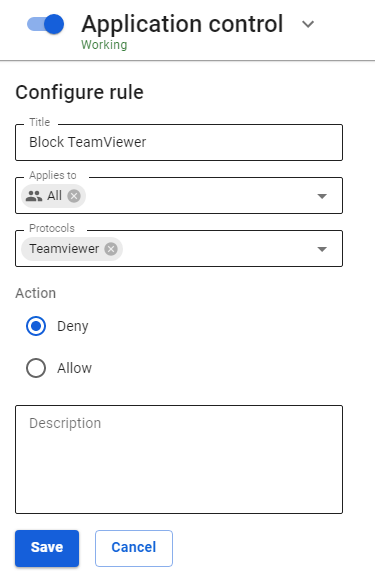
TeamViewer can be blocked using the [**Application control**](https://docs.safedns.com/books/44-setup-traffic-rules/page/application-control) module. To do this, select the protocol of the same name in the rule for users or groups.
[](https://docs.safedns.com/uploads/images/gallery/2022-09/iJ3QM0ao7tMZEnUa-1-blocking-popular-resources.png)
---
#### Blocking Anonymizers
You can block anonymizers in **Traffic rules** in three ways:
1. Anonymizers working over HTTP(S) can be blocked using the **[Content Filter](https://docs.safedns.com/books/44-setup-traffic-rules/page/content-filter)** module (**Anonymizers** category). [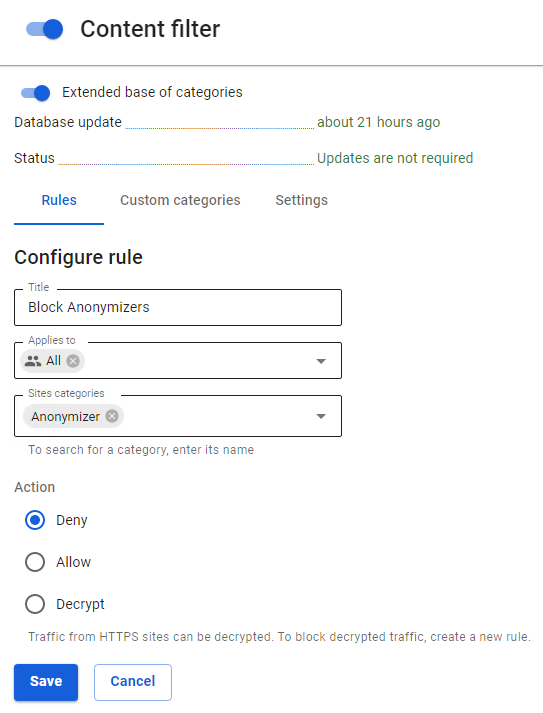](https://docs.safedns.com/uploads/images/gallery/2022-09/aHNJY8k75f1RGYIz-2-blocking-popular-resources.png)
2. To block VPN anonymizers using the PPTP protocol, as a rule, it is enough to block the GRE protocol in the **[Firewall](https://docs.safedns.com/books/44-setup-traffic-rules/page/firewall)** rules. [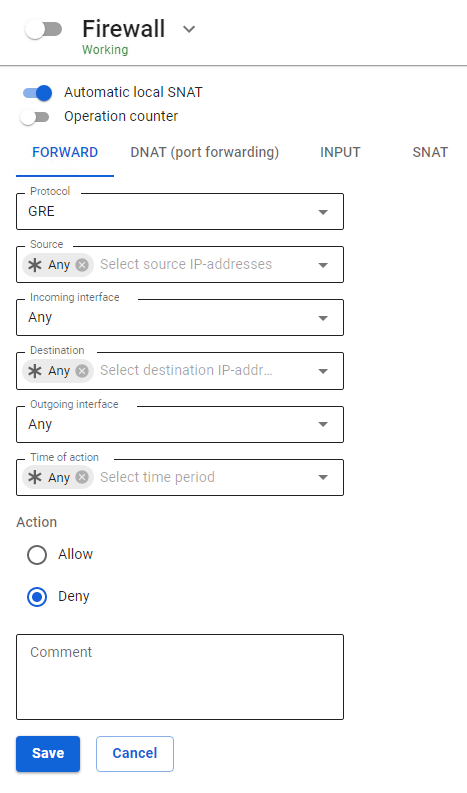](https://docs.safedns.com/uploads/images/gallery/2022-09/QkNC2C7eMVLDBxAr-3-blocking-popular-resources.png)
3. To prohibit circumvention of the content filter, we recommend creating a rule prohibiting direct requests to IP addresses in the [**Content Filter**](https://docs.safedns.com/books/44-setup-traffic-rules/page/content-filter). [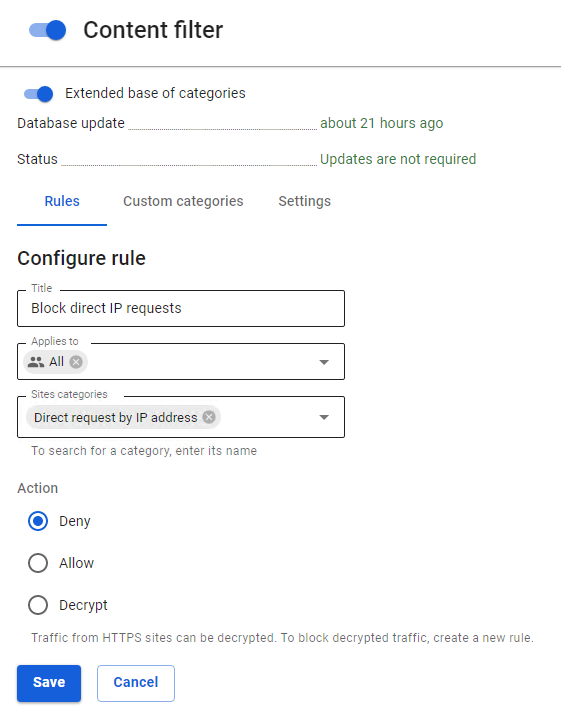](https://docs.safedns.com/uploads/images/gallery/2022-09/PX3OsrcfyVz0pHyi-4-blocking-popular-resources.png)
---
#### Blocking Opera Turbo, Opera VPN, friGate, Anonymox, Browsec
You can block data and some other plugins (anonymizers) and browser functions that are often used to bypass content filtering using the [**Intrusion Prevention**](https://docs.safedns.com/books/44-setup-traffic-rules/page/intrusion-prevention-system) module. To do this, in the tab **Rules** activate the **Anonymizers** rules group and a separate group of **Opera** **VPN** rules to block the service of the same name.
Attempts to bypass content filtering using this software will be recorded in the intrusion prevention system log, after which they will be blocked. An example of the output of information displayed in the intrusion prevention system log is presented below:
- `07/20/2017-15:06:04.056815 [Drop] [**] [1:1001697:1] Opera VPN [**] [Classification: Opera VPN] [Priority: 2] {TCP} 10.80.1.74:64784 -> 169.254.254.254:443`
- `07/20/2017-15:09:20.531169 [Drop] [**] [1:1001675:0] Anonymox HTTP [**] [Classification: Anonymizers] [Priority: 2] {TCP} 10.80.20.95:35576 -> 207.244.89.90:88`
---
#### Blocking TOR
**Tor** is a proxy server system that allows you to establish an anonymous network connection to bypass content filtering.
**Tor** is a specially developed software and proxy server environment designed to bypass various kinds of blocks, which is why it is currently not possible to completely block it.
To counter the use of the Tor network, as well as to log attempts to connect to it and use it, you need to do the following:
1\. Enable the **[Intrusion Prevention](https://docs.safedns.com/books/44-setup-traffic-rules/page/intrusion-prevention-system)** system and activate the **Blocking attacks** category in it, which allows you to block connections to the input nodes of the Tor network.
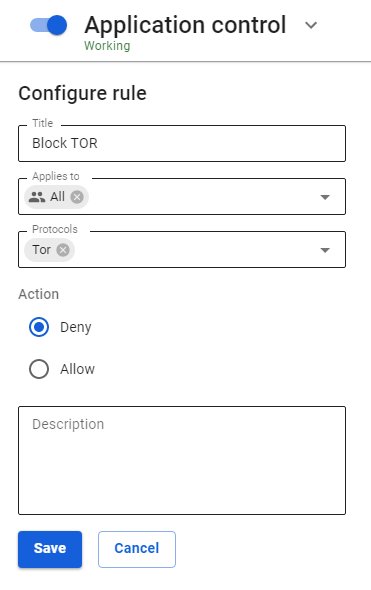
2\. Enable **[Application Control](https://docs.safedns.com/books/44-setup-traffic-rules/page/application-control)** and add a Tor application prohibiting rules to a specific group or all users:
[](https://docs.safedns.com/uploads/images/gallery/2022-09/9gBnUBgcHTBQVDgW-6-blocking-popular-resources.png)
---
#### Blocking Torrents
BitTorrent is a P2P protocol designed for file sharing over the Internet.
To significantly limit the possibility of using torrents, you need to perform the following settings:
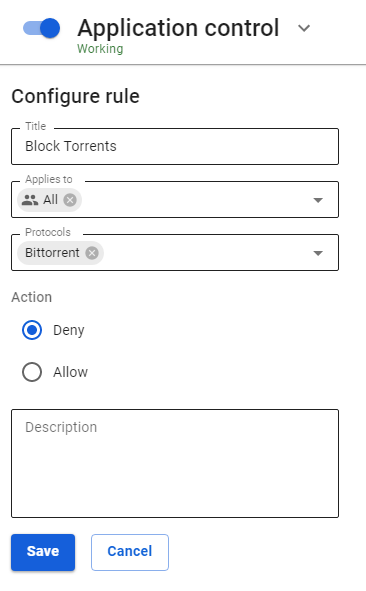
1\. Prohibit BitTorrent protocol using a rule in the [**Application Control**](https://docs.safedns.com/books/44-setup-traffic-rules/page/application-control) module.
[](https://docs.safedns.com/uploads/images/gallery/2022-09/vzNtzUTpunoqcEMC-7-blocking-popular-resources.png)
2\. Use the policy **Prohibit all except what is allowed** when configuring the firewall. Allow the necessary TCP and UDP ports to users by making the last rule prohibiting.
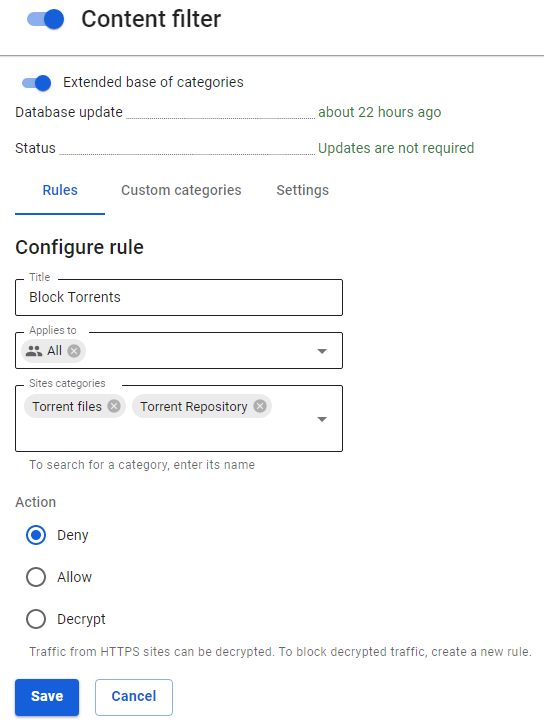
3\. Prohibit torrent file directory sites using the [**Content Filter**](https://docs.safedns.com/books/44-setup-traffic-rules/page/content-filter) module by prohibiting the Torrent Trackers category. And prohibit downloading files with the extension .torrent.
[](https://docs.safedns.com/uploads/images/gallery/2022-09/2SDtV8qM5aZZloeD-8-blocking-popular-resources.png)
4\. Enable the **[Intrusion Prevention](https://docs.safedns.com/books/44-setup-traffic-rules/page/intrusion-prevention-system)** system and activate the category **Requests** **to compromised resources** in it**,** which allows you to block the activity of P2P programs.