It is possible to restore to the previous version after updating SafeUTM from version 13.0.
When updating UTM to version 13.0 and higher, all the information of the version you are updating from will be saved on the UTM disk. To restore, follow these steps: 1\. Go to SafeUTM local menu. 2\. Enter the administrator’s username and password. 3\. Enter **15** and press **Enter**: [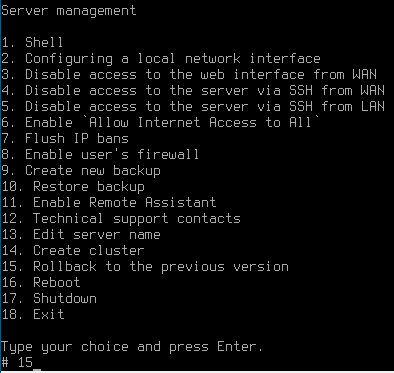](https://docs.safedns.com/uploads/images/gallery/2022-09/LzQpiJCrQ64eJeo4-1-how-to-restore-to-previous-version-after-updating-safeutm.png) A window will appear with a warning and a description of the version to which it will restore. 4\. Confirm your choice by typing **y** and pressing **Enter.** 5. After rebooting, SafeUTM will restore to the previous version.The previous version will be restored with the settings and logs that were in SafeUTM at the time of the update. When restoring the previous version, settings and logs from the updated version are not transferred to the previous version.