Select the "**Forced DNS Redirection**" to force all DNS requests from the network to use SafeDNS servers, even if the end device has custom DNS servers.
2\. In the **"WAN Setup"** section check the **"Ignore WAN DNS"** option. [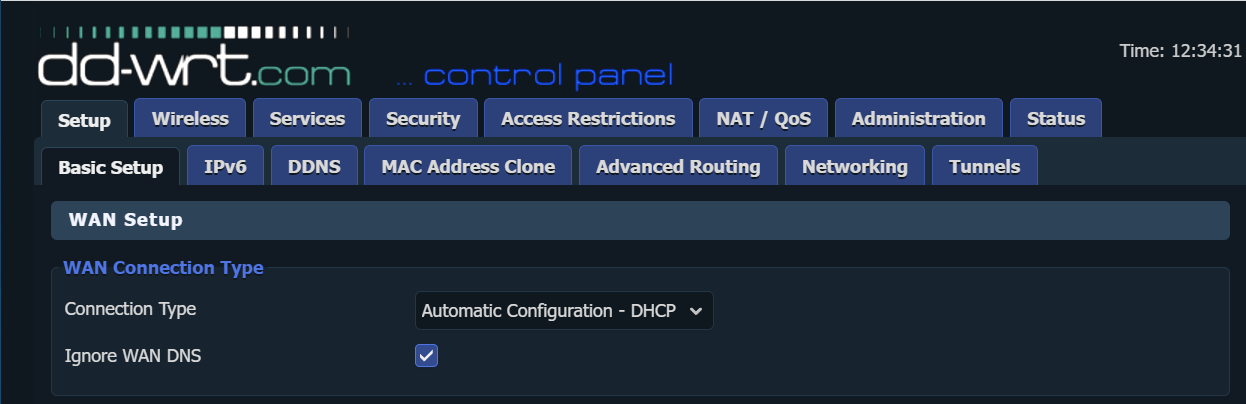](https://docs.safedns.com/uploads/images/gallery/2023-04/2vsVUpWIM4TXMu0l-ddwrt-wan.png) 3\. Go to the **DDNS** tab. 4\. Select **Custom** for DDNS Service type. 5\. Type in ***www.safedns.com*** in the **DYNDNS Server** field. 6\. Type in your login (email) from the SafeDNS account in the **User Name** field. 7\. Type in your password in the **Password** field. 8\. Type in any name (hostname) in the **Host** field. 9\. Type in ***/nic/update?hostname=*** in the **URL** field. 10\. **Save and apply** settings. [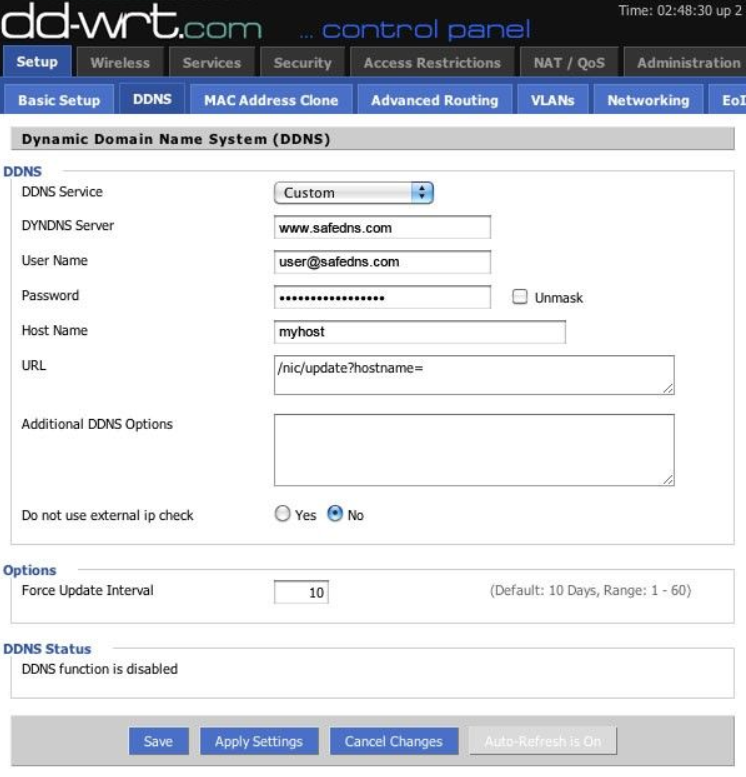](https://docs.safedns.com/uploads/images/gallery/2022-08/nSCAXgzaTREjFdP6-2-dd-wrt-router-setup-guide.png) If all settings are correct, you will see the successful update of your address in the DDNS Status block. After that, you can continue configuring your filtering options in the [SafeDNS Dashboard](https://www.safedns.com/cabinet/main/).Please note that settings take 5-7 minutes to apply. Stats and filtering status update every 10 minutes.