It is not possible to run SafeDNS, [Cloudflare DNS](https://help.keenetic.com/hc/en-us/articles/360014264779), and [AdGuard DNS](https://help.keenetic.com/hc/en-us/articles/360000582119) services at the same time. Only one of them can be used.
Before setting up the Internet safety service, register your home network devices according to the instruction [Connected devices registration](https://help.keenetic.com/hc/en-us/articles/360000394159).
#### Setup 1\. Select "SafeDNS" in the 'Service' field on the "Internet safety" page. [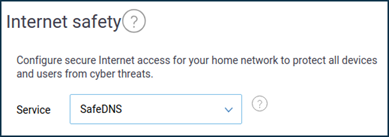](https://docs.safedns.com/uploads/images/gallery/2022-09/Lx2OrS3Tvtw4cEU8-1-keenetic-router-setup-guide.png) 2\. Enter your SafeDNS account's parameters by clicking "Log in" in the "SafeDNS account" section. If you do not have a SafeDNS account yet, click "Create account". [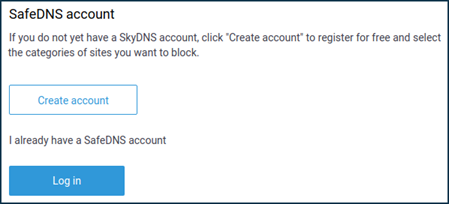](https://docs.safedns.com/uploads/images/gallery/2022-09/cnsAY3XDcfV6P0K4-2-keenetic-router-setup-guide.png) 3\. Enter your SafeDNS account e-mail/login and password. [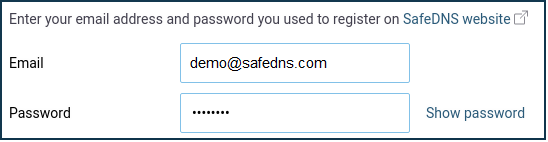](https://docs.safedns.com/uploads/images/gallery/2022-09/UDjvWoq6FyrDaJgb-3-keenetic-router-setup-guide.png) 4\. Assign filtering policies in the "Assignment of protection policies to devices" section. You can assign filtering policies to permanent home network devices (registered in Keenetic) and the default policy for all unregistered devices. [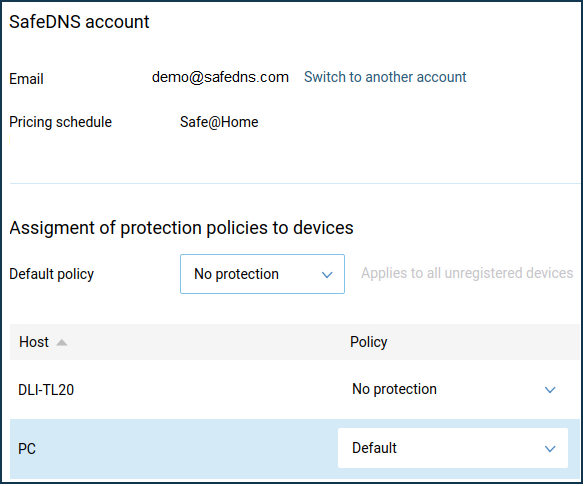](https://docs.safedns.com/uploads/images/gallery/2022-09/ad7KyQSsi0MMRXXj-4-keenetic-router-setup-guide.png) Your devices connected to the Keenetic router are now filtered with the assigned SafeDNS filtering policies.Please note that settings take 5-7 minutes to apply. Stats and filtering status update every 10 minutes.