# Architecture and deployment
### Components
[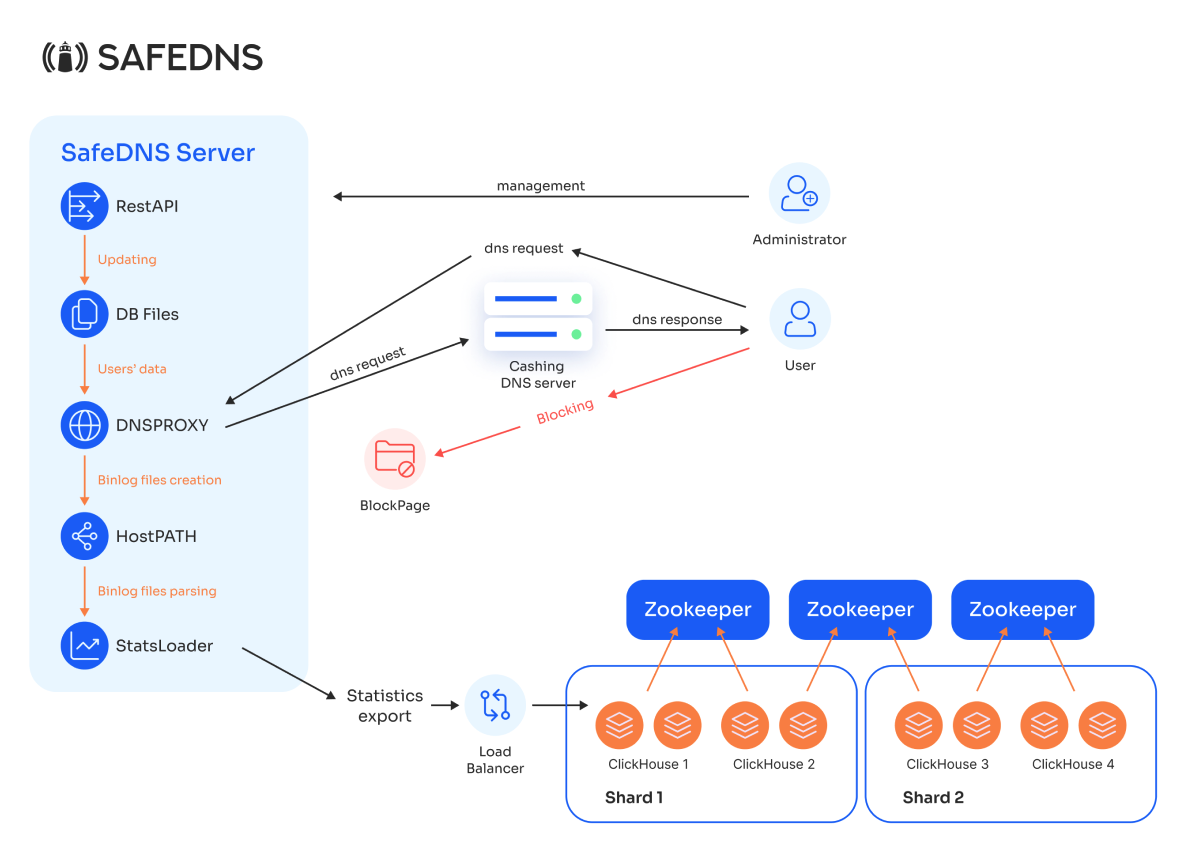](https://docs.safedns.com/uploads/images/gallery/2026-03/MuD0Wr8fD6cCi4bA-image-1772786479925.png)
SafeDNS Shield is composed of the following components:
- **DNS Proxy Module**
The core filtering engine. It receives DNS requests from end users, identifies the requesting user, applies the configured filtering policy, and returns either the resolved IP address or the IP address of a block page.
- **Internal Database**
Stores all configuration and policy data: user identifiers (subnet, IP, port), filtering profiles, block pages, user groups, and their assignments.
- **Block pages**
HTTP/S pages served to the users instead of blocked websites. Can be hosted alongside Shield or on an external server.
- **REST API**
Provides a management interface for administrators to update the Internal Database. It supports creation and modification of:
- User identifiers (subnet, IP, port)
- Filtering profiles (categories to block)
- Block pages
- **Binary Log Parsing Module (StatsLoader)**
Processes the binary log files generated by the DNS Proxy. It parses the DNS query logs, extracts statistics, and sends them to the ClickHouse cluster for storage and analysis.
- **ClickHouse Cluster**
A distributed database for storing and analyzing DNS request statistics. The cluster is divided into shards, each containing multiple mirrored nodes for fault tolerance and high‑performance parallel reads and writes.
- **Load Balancer**
Receives statistics data from StatsLoader and distributes it evenly across the ClickHouse cluster nodes.
- **ZooKeeper**
Manages coordination and configuration of the ClickHouse cluster, ensuring data consistency and system reliability.
The DNS Proxy writes its binary query logs to a designated host path (`HostPATH`), from which StatsLoader reads them.
**External dependencies**
The following elements are not part of SafeDNS Shield but are required for operation:
- **User** – The end‑user device that sends DNS requests to SafeDNS Shield.
- **Caching DNS Server** – A recursive resolver deployed on the organization’s network that performs upstream DNS resolution for allowed queries.
### Deployment options
SafeDNS Shield supports multiple deployment options to accommodate different network topologies. This section describes the most common scenarios.
##### For ISPs
##### **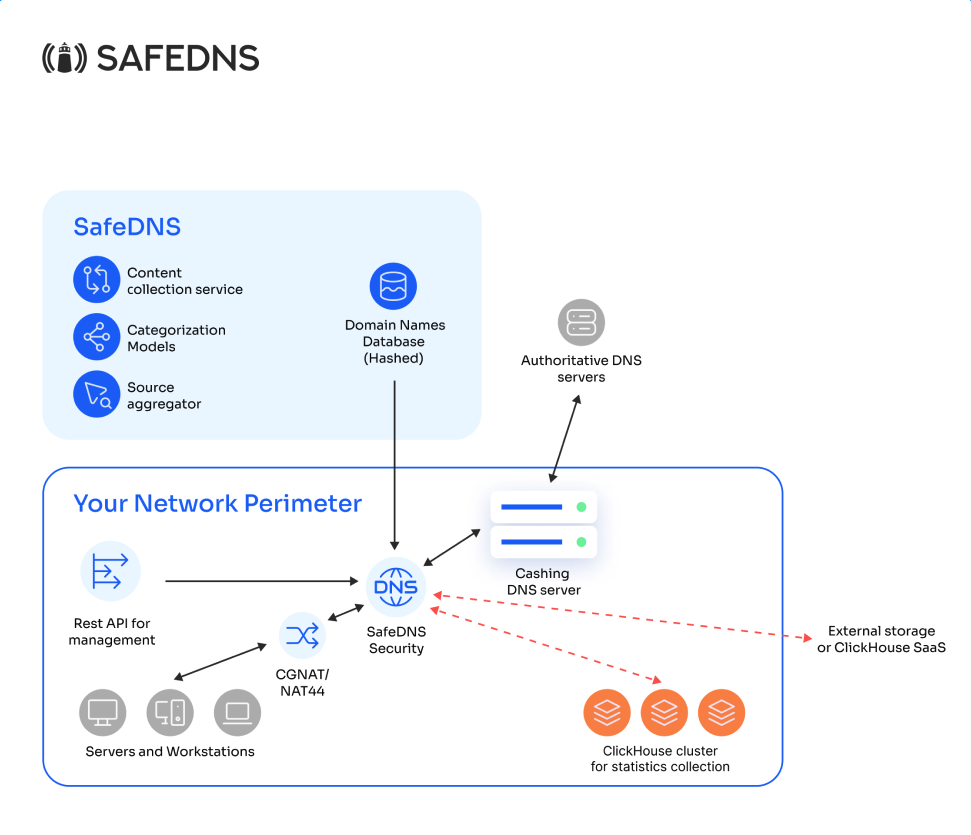**
This deployment option is used in ISP networks, where NAT separates end users from the on-premises DNS infrastructure, making it impossible to identify them solely by their individual IP addresses.
##### For corporate clients
[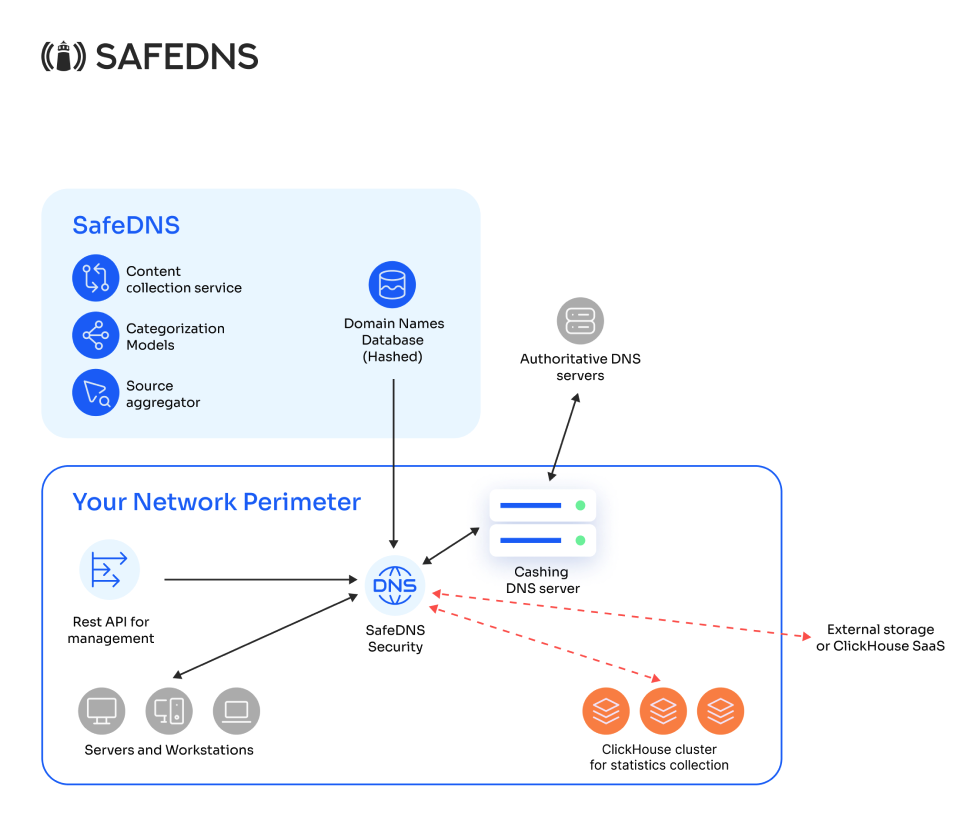](https://docs.safedns.com/uploads/images/gallery/2026-03/eNEcaAFBnndiMMt5-image-1772786346085.png)
or
[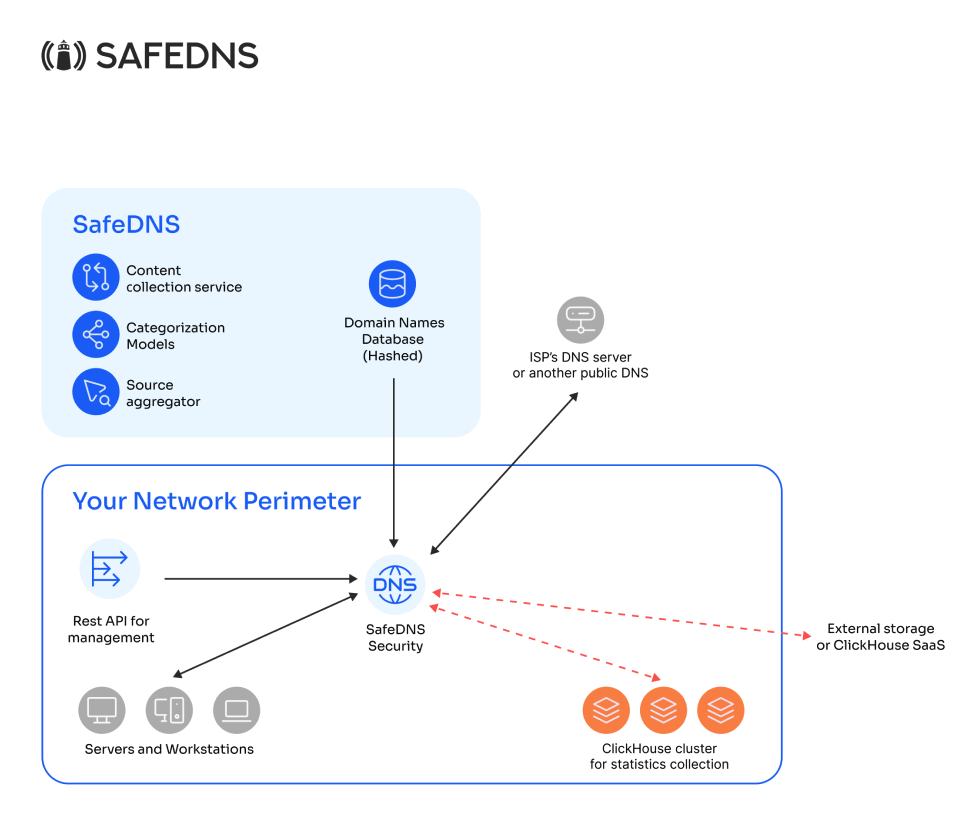](https://docs.safedns.com/uploads/images/gallery/2026-03/wUXsLWAApQ8PeBDb-image-1772786395390.png)
This deployment option is used in corporate networks where end users can be identified by their individual IP addresses at the point where SafeDNS Shield is deployed. Depending on whether the organization has its own caching DNS server, requests are forwarded to that server or to an external resolver, such as an ISP’s DNS or a public DNS service (e.g., 1.1.1.1 or 8.8.8.8).
### User Identification
**User Identification**
To apply filtering policies and to separate statistics on a per‑user basis, SafeDNS Shield must identify each end user. Identification is based on the source address of the DNS request and can be configured using one of the following methods:
- **IP address** – Use when each user has a unique IP address.
- **IP subnet** – Use when per‑user granularity is not required and all users in a subnet can share the same policy.
- **IP:port** – Use when multiple users share a single IP address (for example, behind NAT44 or CGNAT). The source port distinguishes individual users.
- **IP:port range** – Use when users can be identified by a range of source ports on a shared IP address.
The appropriate method depends on the network topology and the level of user separation required.