Automatic Authorization and De-authorization Scripts
For that you need to configure scripts executed when users log on and log out of the system. For example, it can be done using domain group policies (GPOs).
For these scripts to work, it is necessary to set up all domain and browser security policies described in User Authorization.
User Authorization
You need to add the script to scenarios executed at system log inon.
UTMLogon_script.vbs
Dim IE
Set IE = CreateObject("InternetExplorer.Application")
IE.Visible = True
IE.Fullscreen = False
IE.Toolbar = False
IE.StatusBar = False
Wscript.Sleep(3000)
IE.Navigate2("http://ya.ru")
Wscript.Sleep(20000)
IE.Quit
User De-Authorization
It is convenient to use this script when one computer is used by different users to go to internet resources. This script can be downloaded from the web interface by clicking Download deauthorization script. To do this, in section Users -> Authorization, check the box Web authentication: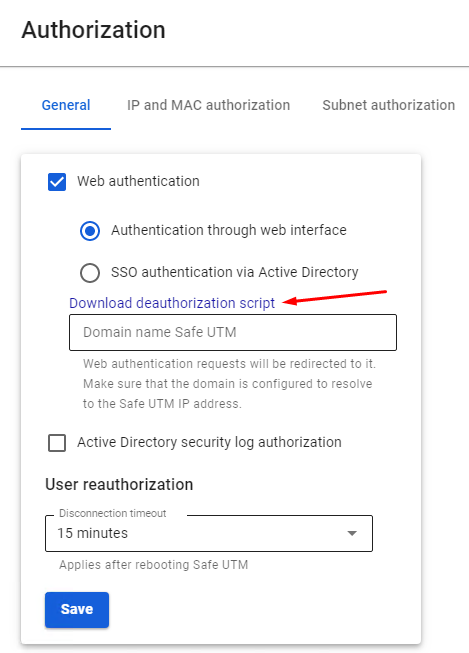
You also need to disable the warning about certificate address mismatch in Internet Explorer properties: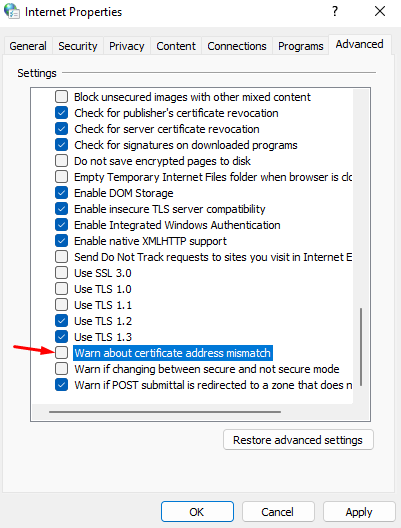
This parameter can also be set up in GPO by changing the registry parameter: HKEY_CURRENT_USER\Software\Microsoft\Windows\CurrentVersion\Internet Settings parameter WarnonBadCertRecving = 0
Next, you need to add the script executed when the user logs out of the system:
UTMLogout_script.ps1
add-type @"
using System.Net;
using System.Security.Cryptography.X509Certificates;
public class TrustAllCertsPolicy : ICertificatePolicy {
    public bool CheckValidationResult(
        ServicePoint srvPoint, X509Certificate certificate,
        WebRequest request, int certificateProblem) {
        return true;
    }
}
"@

[System.Net.ServicePointManager]::CertificatePolicy = New-Object TrustAllCertsPolicy
[Net.ServicePointManager]::SecurityProtocol = "tls12, tls11, tls"
Invoke-RestMethod -Uri "https://<utm ip-adress>:8443/auth/sessions/logout" -Method Delete
Enter the IP address of the local SafeUTM instead of “UTM interface IP address”. If there are several local interfaces on SafeUTM, you must specify the IP address of the local interface from the same subnet as the user's computer.
Possible Errors When Executing Scripts
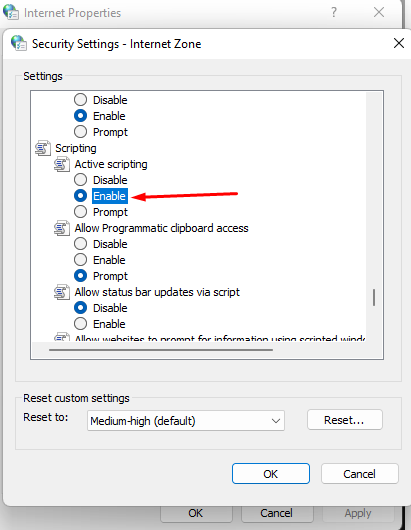
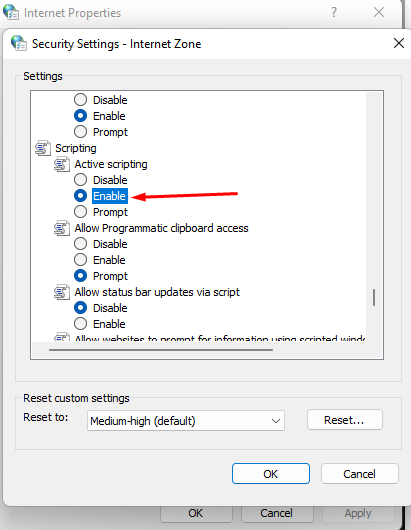
- If in Internet Explorer a window appears with the text “Authorization is required to gain access”, and authorization occurs only when you manually click on the authorization link, redirect to the authorization page may not occur in the browser (it may be restricted by the browser security settings). In this case set parameter Active Scenarios in Internet Explorer to Enable.
- The group policy is not updated automatically immediately after the changes have been made. In order for the scripts to start working, update the policy manually running the command
gpupdate /forceon the workstation.