
User tree
In the SafeUTM management interface, users are displayed as a tree.
Users can be organized into trees. The group nesting level is not limited.
The user account tree is available in Users -> AccountsUser & Group.
SafeUTM implements the principle of inheritance, which makes it easy to set and change parameters common for users, defining them for the parent group, for example, quotas or remote VPN access. The principle of inheritance is very convenient for performing management operations related to all users in the group.
An example of a user tree can be seen below:
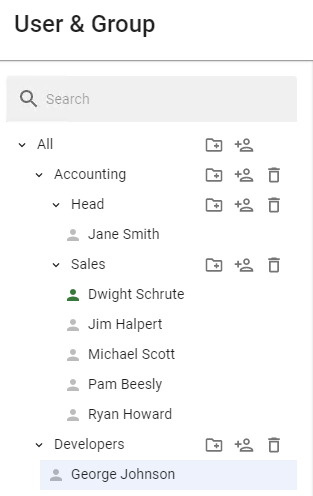
The user’s icon can be colored differently. The table below provides a description of each color of the user’s icon:
|
User Account Status |
Description |
|
|
|
|
|
Authorization restriction has been selected in the User |
|
|
|


