
Server Management
In the central console (Safe Center), the sections Automatic Update, Backup, and Terminal are similar to these sections in SafeUTM.
Administrators
In Safe Center, you can create several administrators with different roles:
- Administrator - an administrator with this role has access to all Safe Center functionality (more about features);
ViewRead-only - an administrator with this role cannot manage rules in Safe Center (create, change priority, etc.). But can switch to connected SafeUTMs and manage them.
All administrators (both Administrator and View Read-Only) can delete connected SafeUTM from Safe Center.
There are two ways to connect to the SafeUTM web interface from the Safe Center located in the Safe Center:
- From the Servers section (by clicking on the eye icon);
- By clicking on the arrow in the upper left corner, and selecting the desired UTM:
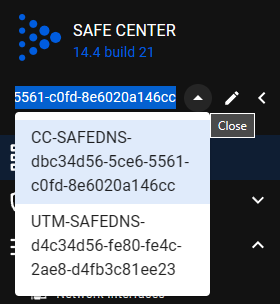
It is not possible to log in to the connected SafeUTM with the Safe Center administrator login and password.
Additional InformationSettings
The following settings are available in the section:
AddressCentralofconsole'sthe central consoleaddress - the field is filled in if the Safe Center server is behind NAT;Setting the timeTime zone settings - changes take effect only after restarting the Safe Center;- Language settings - changes take effect only after restarting Safe Center.