
Remote Access for Server Management
SSH Connection from Local Network
To connect to the server's local menu from a local network via SSH, you must:
1. Allow SSH connection. To do this, go to Server Management -> Administrators and activate item SSH access from LANs.
2. Connect to the server using any SSH client (for example, PuTTY) using port 22. You can download PuTTY SSH client from https://www.putty.org/. It is necessary to specify the Administrator’s login and password.
Use the command ideco-local-menu to launch the menu or command mc to launch the file manager.
SSH Connection from Internet
To connect via SSH from the Internet to the local server menu, you must:
1. Allow SSH connection from the Internet. To do this, go to Server Management -> Administrators and activate item SSH access from external networks.
2. Connect to the server using any SSH client (for example, PuTTY) using port 22. It is necessary to specify the Administrator’s login and password.
Use the command ideco-local-menu to launch the menu or the command mc to launch the file manager.
Access to Server Management Web Interface from Internet
Direct access to SafeUTM web interface from the Internet is prohibited by default. You can use one of the methods listed below:
1. Enable the function Access to the web interface from an external network in Server Management -> Administrators (this will only allow access by IP address with port 8443).
2. Create a VPN connection to the server, for example, via IPsec, IKEv2 or SSTP. After connecting, you can go to the web interface with the IP address of any local interface (including the IP address from the range for VPN connections. The default address is 10.128.0.1).
3. Create a rule in the reverse proxy for publishing the web interface:
3.1. Go to Services -> Reverse Proxy.
3.2. Add a new rule by filling in the fields as follows:
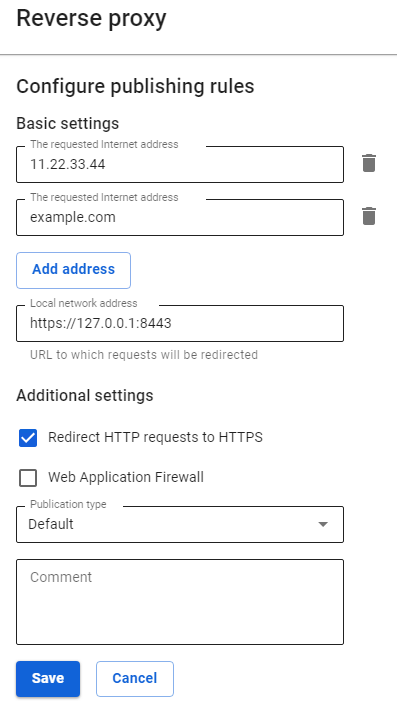
As the requested address, specify the IP address or domain name assigned to SafeUTM external interface.
3.3. Click Save.
3.4. Go to one of the addresses that you specified in the requested addresses.